PAC · SWIFT Framework

My First 7 Phases

📍
7 Phases
SWIFT Framework
Home 📂Directory 🚦Onboarding
FIRST 7 PHASES
📍All 7 Phases 0Tools Setup ⭐ 1Brand Foundation 2Instagram Setup 3Lead Magnets 4ManyChat Automation 5Conversation & Close 6Programme Page 7Social Proof & Growth
SWIFT Programme
SSignature WWebinar IInvite FFill Class TTrack
Resources
Mindset & Systems
🧠Just in Time Mindset Be. Do. Have. 🎯Deliberate Practice 🧘Mind & Body 5️⃣The Daily 5 📅Calendar Plan
Get Students
📸IG & FB Ads 📞Sales Call 🎉Parties for Kids 🗓️Holiday Workshops
Business
💳Monthly → Annual
Tools
🤖AI & Automation 🎬Video Content
6 Prompts
6All Prompts ✦ Signature Programme ✦ Lead Magnet ✦ Teach to Pitch ✦ Content Style ✦ Lead Collection Form ✦ Feedback Form
Build
Product Creation 🚀Build on Vercel
Community
Account
Settings
0 · Setup ⭐ 1 · Brand 2 · Instagram 3 · Lead Magnets 4 · ManyChat 5 · Close 6 · Programme 7 · Growth
⭐ For New Students — Start Here
✶ Complete Action Roadmap

My First 7 Phases

34 steps. Every one supported by a Claude prompt or skill. Follow in order, tick off as you go — and you'll always know exactly where you are and what to do next.

8
Phases
34
Action Steps
3
Video Guides
15+
Claude Prompts
⬇ Download Claude  ·  claude.com/download
0
Phase 0 · Start Here First

Set Up Your Tools

Before anything else, get these 7 tools in place. Most are free. Each takes 5–10 minutes to set up. If you get stuck at any point, open Claude Code and ask it to guide you step by step.

0a

Download Claude

Your AI co-pilot for every step in this roadmap. Download the desktop app so you can drag files, paste screenshots, and work hands-free.

💡Use the free tier to start. The prompts in this roadmap are designed to work with Claude's free plan — upgrade when you're ready to go faster.
⬇ Download Claude  ·  claude.com/download
0b

Get ChatGPT Plus

ChatGPT's image generation (DALL·E) is useful for creating quick visuals. Sign up at chatgpt.com — the free plan is fine to start.

0c

Create a GitHub Account

GitHub is where your website code lives. Create a free account at github.com — you'll need it to connect Vercel in the next step.

ℹ️Steps: Go to github.com → click "Sign up" → enter your email and create a password → verify your email. That's it. If you get stuck, open Claude Code and ask: "Guide me step by step to create a GitHub account."
🌐 Go to github.com
0d

Create a Vercel Account

Vercel hosts your website pages for free. Sign in with GitHub — one click, no card needed. This is how your lead magnet pages and programme page go live.

ℹ️Steps: Go to vercel.com → click "Sign Up" → choose "Continue with GitHub" → authorise Vercel. Done. If you get stuck, open Claude Code and ask: "Guide me step by step to create a Vercel account and connect it to GitHub."
🌐 Go to vercel.com
0e

Switch to an Instagram Business Account

You need a Business or Creator account to access insights, run ads, and connect ManyChat. Takes 30 seconds to switch — no content is lost.

ℹ️How to switch: Instagram → Profile → ☰ Menu → Settings → Account → Switch to Professional Account → choose Business. If you get stuck, open Claude Code and ask: "Guide me step by step to switch my Instagram to a Business Account."
0f

Set Up ManyChat

ManyChat automates your Instagram DM replies — so when someone comments or DMs a keyword, they get the lead magnet link instantly, even while you sleep.

ℹ️Steps: Go to manychat.com → Sign up with your email → Connect to Instagram → authorise the permissions. If you get stuck at any point, open Claude Code and ask: "Guide me step by step to create a ManyChat account and connect it to my Instagram."
🌐 Go to manychat.com
0g

Download WhatsApp Business

WhatsApp Business lets you set quick replies, an away message, and a business profile — so parents always get a response, even if it's automated.

💡Use a separate number for business, or port your existing number. Set up: profile photo, business description, opening hours, quick reply for "Hi, I'm interested in your class" — you'll use this in Phase 5.
🧠 Before You Begin

The Mindset That Makes Everything Work

Tactics without the right headspace will burn you out. Ground yourself in these first — then every step in this roadmap will feel lighter.

🤝
Client First. Always Add Value.

Every post, every DM, every webinar — lead with what's useful for them. When parents feel genuinely helped, trust builds naturally. Sales follow trust.

🔄
If Leads Come — Great. If Not — Try Again.

No result is failure — it's data. If something doesn't pull leads, tweak the hook, change the angle, post again. You only lose when you stop.

Fail Forward Fast.

Don't spend two weeks perfecting a post. Ship it in two hours, see what lands, improve the next one. Speed of learning beats perfection every time.

🌿
Stay Calm & Relaxed.

Desperation repels. When you're grounded, your content feels safe and parents sense it. Take care of yourself — a calm tutor attracts calm, committed families.

Attract Aligned, Higher-Quality Clients.

You don't need everyone. You need the right parents — the ones who value what you do and show up consistently. Be specific about who you're for. The rest will self-select.

🌱
Trust the Compound Effect.

One post won't change your business. 100 posts will. Each reel, carousel, and DM reply is a small brick — invisible alone, but over months they build something your competitors can't copy.

1
Phase 1

Brand Foundation

Do this once. Get it right. Everything else builds on it — your colours, voice, and niche define every piece of content you create.

1a

Define your niche

Who exactly do you help? Subject, level, and most importantly — the specific struggle. The more precise you are, the more parents feel like you're talking directly to them.

💡Bad: "I teach Maths." Good: "I help P5–P6 students stop second-guessing themselves in Paper 2."
✦ Claude Prompt
Help me define my teaching niche. I teach [subject] to [age group / level]. My students most commonly struggle with [list 2-3 specific problems]. Help me write a one-sentence niche statement in this format: "I help [who] [achieve what] by [how]." Give me 3 versions to choose from.
1b

Build your brand colour palette

Consistent colours = instant recognition. Think Tiffany's turquoise, Uniqlo's red. Upload a screenshot of your IG or logo to Claude and extract your palette.

📹 Watch First
✦ Claude Prompt — paste your screenshot after this
I'm going to paste a screenshot of my brand / social media profile / marketing materials. Please: 1. Read the colours you see from the image 2. Identify my primary colours (background, headings, key accent) 3. Identify my secondary colours (supporting tones) 4. Give me the HEX code for each colour 5. Advise me on which secondary colours to remove so the palette stays cohesive 6. Show me a visual swatch card of the final colour palette
💡Stick to 2–3 main colours. Save your HEX codes — you'll use them in every step that follows.
1c

Define your brand voice

How do you sound? Warm? Direct? Encouraging? Playful? Your voice should feel like you — so parents feel they know you before they ever meet you.

✦ Claude Prompt
Based on these 3 captions I've written [paste 3 examples], describe my brand voice in 5 words. Then write a one-paragraph tone guide I can give Claude every time I ask it to write content for me — so it always sounds like me.
2
Phase 2

Instagram Setup

Your storefront. First impressions happen here. A parent visits your profile in 3 seconds — your bio, pinned post, and highlights decide if they stay.

2a

Optimise your IG bio

Clear niche + who you help + one CTA + your link. Under 150 characters. A parent should know within 3 seconds if you're right for their child.

✦ Claude Prompt
Write 3 versions of my Instagram bio. I'm a [subject] tutor helping [who — e.g. P5–P6 students struggling with Paper 2]. My link is [URL]. Keep each under 150 characters. Include one emoji. End with a soft CTA like "Free guide ↓" or "DM STUDY for tips".
2b

Build your link-in-bio page

One Vercel page that houses all your lead magnets — so one bio link goes everywhere. No Linktree needed. Claude builds it in minutes.

✦ Claude Prompt
Build a mobile-first link-in-bio page for a [subject] tutor. My name is [name]. Include buttons linking to: 1. [Lead Magnet 1 title] → [URL] 2. [Lead Magnet 2 title] → [URL] 3. WhatsApp → https://wa.me/[number] 4. Instagram → https://instagram.com/[handle] Use my brand colours: primary [HEX], accent [HEX]. Font: DM Sans. Clean, modern design. Deploy on Vercel.
2c

Create branded IG highlight covers

5 covers: Free Resources · Testimonials · About Me · Tips · Enrol Now. Consistent style = professional profile at a glance.

✦ ChatGPT Image Prompt
Create 5 Instagram highlight cover icons in flat design style. Background colour: [your HEX]. Icon colour: white. Simple, minimal icons for these 5 labels: Free Resources, Testimonials, About Me, Tips, Enrol Now. Square format, 1:1 ratio. No text — icon only. Consistent visual style across all 5.
2d

Create your pinned carousel post

A 3–7 slide carousel addressing ONE specific pain point — ending with a CTA to comment a keyword for the free lead magnet. This is the engine of your funnel.

📹 Watch: How to Create Carousel Images with ChatGPT
📸
Real Example on Instagram
See how a carousel addresses a specific maths pain point → taps lead magnet
View ↗
📥
John's Carousel Skill
Pre-built Claude skill that generates ChatGPT image prompts for your carousel. Edit the HEX codes (from Step 1b) and swap the topic for your pain point.
⬇ Download
💡Carousel structure: Slide 1 = hook (name the pain) · Slides 2–3 = why it happens · Slides 4–5 = one small win · Last slide = "Comment [KEYWORD] for the full guide"
2e

Post and pin to your IG profile

Go live. Then tap the three dots on the post → Pin to your profile. This stays at the top permanently until you replace it.

💡You can pin up to 3 posts. Start with one. Done is better than perfect — you can replace it with a better version next month.
3
Phase 3

Lead Magnets

Give first. Trust follows. A single web page — not a PDF — that solves one problem so well that parents immediately think: "This person really knows what they're doing."

3a

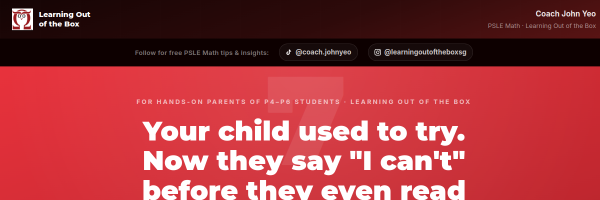
Build Lead Magnet 1 — General guide

Broad topic, wide appeal. 5–7 actionable steps on a single Vercel page. This is what you send in the ManyChat auto-DM.
✦ Claude Prompt
Build a single-page lead magnet website for a [subject] tutor. Title: "7 Proven Steps to Help Your Child [Specific Outcome]" Audience: Parents of [level] students in Singapore For each of the 7 steps: - Bold headline (the step name) - 2–3 sentences of practical advice - One thing the parent can try today End with a soft CTA: "Want personalised help? Message me on Instagram @[handle]" Design: Clean white background, [primary HEX] accent, DM Sans font, mobile-friendly. Deploy on Vercel. No login required.
3b

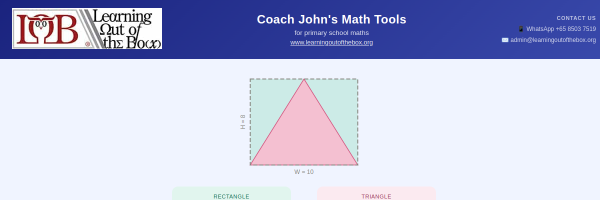
Build Lead Magnet 2 — Specific tool

Solves ONE exact concept interactively. A worked example, a visual, or a mini calculator. This is what you promise in the WhatsApp follow-up DM.
✦ Claude Prompt
Build a single interactive page that teaches students why [specific concept — e.g. "a triangle is always half the area of a rectangle"]. Include: 1. A clear visual diagram showing the relationship 2. Step-by-step explanation in simple language (no jargon) 3. One interactive example where the student inputs numbers and sees the calculation live 4. A short "Try It Yourself" practice question at the bottom Design: Bright, student-friendly — use colours [HEX1] and [HEX2]. Large font, big buttons, works perfectly on mobile. No login. Deploy on Vercel.
3c

Add email capture to both pages

Don't lose leads who browse but don't WhatsApp. A simple Google Form embedded at the bottom catches them — free, instant, no setup needed.

✦ Claude Prompt
Add a simple email capture section at the bottom of my lead magnet page. Text: "Want more free resources like this? Drop your email below." Embed a Google Form using an iframe. My Google Form embed URL is: [paste your Google Form embed URL here — from Google Forms → Send → Embed tab → copy the src URL] Style the iframe to match the page: no border, full width, height 400px. Wrap it in a section with a heading and short subtext. Mobile-friendly.
ℹ️How to get your Google Form embed URL: Open Google Forms → click Send → click the <> Embed tab → copy the URL inside the src="" attribute of the iframe code.
📺 Video Tutorial — How to Create a Google Form
3d

Test both pages on your phone

Open each page on mobile. Read every word. Tap every button. If anything looks broken, describe what you see to Claude and ask it to fix it.

💡80%+ of parents will view your lead magnet on mobile. If it doesn't feel great on a phone, rebuild it mobile-first.
3e

Run a Free Parents Webinar

Your strongest lead magnet is you, live. A free 60-min Zoom for parents builds trust fast — then at the end, you invite their kids to a paid workshop. Parents who show up already sold.

Step 1 · Free
"Why Your Child Struggles With [Subject]"
60 min · Zoom · Parents only
Step 2 · Paid
"[Subject] Breakthrough Workshop for Kids"
90 min · $40–80/child · 8–12 students
📺 How to Run a Parents Webinar
✦ Claude Prompt
Help me plan a free 60-minute Zoom webinar for parents of [age group] students who are struggling with [subject]. Webinar title: "Why Your Child Struggles With [Subject] — And What Actually Works" Give me: 1. A 6-part agenda with timing (hook, problem, root cause, my method, results story, CTA) 2. A strong opening hook line parents can't ignore 3. One hands-on activity parents can try live 4. A closing pitch script (under 2 minutes) to invite kids to a paid workshop Keep the tone warm, expert, and parent-friendly — not salesy.
4
Phase 4

ManyChat Automation

Set it up once. It runs 24/7. When someone comments on your post, they instantly get your lead magnet — no manual sending, no missed leads.

4a

Set up your ManyChat free account

Go to ManyChat, create a free account, and connect your Instagram. The free plan is enough to run your entire funnel at the start.

💡Free plan allows: Comment-to-DM automations, keyword triggers, basic flows. Upgrade only when you're sending 1,000+ DMs/month.
4b

Create your Comment-to-DM flow

In ManyChat: New Flow → Comment trigger → choose your pinned post → set keyword (e.g. GUIDE) → auto-DM sends your lead magnet link instantly.

✦ Auto-DM Template (copy into ManyChat)
Hey [First Name]! 👋 Here's your free guide: [paste your lead magnet URL] Hope it helps! Quick question — is [specific struggle, e.g. "Paper 2 problem sums"] something your child is dealing with right now?
4c

Write your follow-up DM (30–60 min later)

After they receive the lead magnet, send a warm check-in. Promise Lead Magnet 2 via WhatsApp — and ask for their number. This is how you bridge IG DM → WhatsApp.

✦ Follow-up DM Template
Hey [First Name]! Checking in — hope the guide was helpful 😊 I actually have another free resource on [related topic] that goes a bit deeper on [specific concept]. It's easier to send it over WhatsApp. Would that be okay? What's your number? I'll drop it there for you 📲
✦ Claude Prompt — customise this for your subject
Write a follow-up DM for a [subject] tutor to send 1 hour after delivering a free guide on [topic]. The goal is to start a genuine conversation and offer a second free resource via WhatsApp to get their phone number. Warm tone, not salesy. Under 80 words.
4d

Create a second keyword flow for Lead Magnet 2

A different post, different keyword, same funnel logic. Now you have two entry points — more chances to capture different parents at different stages.

💡Use different keywords per lead magnet (e.g. GUIDE, TIPS, FREE, VISUAL) so ManyChat can track which one is working best.
5
Phase 5

Conversation & Closing

This is where students are won or lost. Not because of your programme — because of how you make parents feel heard. Listen first. Invite only when it's genuinely right.

5a

Set up WhatsApp Business

Separate from personal. Add your business name, description, and hours. Set up quick replies for common questions. This is where your real conversations happen.

✦ Claude Prompt — Quick Reply Templates
Write 5 WhatsApp Business quick reply templates for a [subject] tutor. Include replies for: 1. New enquiry greeting 2. "What are your rates?" 3. "Is there a trial class?" 4. "Can you send more info?" 5. Away message (outside business hours) Warm, professional, under 50 words each.
5b

Write your WhatsApp conversation script

3 questions to ask. How to listen. When to offer. The goal is understanding — not selling. Parents who feel heard trust you.

✦ Claude Prompt
Write a WhatsApp conversation script for a [subject] tutor speaking to a parent who just received a free lead magnet. Goal: understand their child's challenge, build trust, and invite them to a trial class only if it's a genuine fit. Include: - Opening message after sending Lead Magnet 2 - 3 discovery questions to ask (one at a time) - How to respond if the child's problem matches what you teach - How to respond if it's not a good fit (refer gracefully) Tone: warm, conversational, never pushy.
5c

Write your closing invitation

Not a pitch. An honest offer for the right fit. After listening, you share what you do simply — and invite them only if you genuinely believe you can help.

✦ Claude Prompt
Write 3 versions of a soft closing message a [subject] tutor can send on WhatsApp after a genuine conversation, inviting the parent to a trial class. Each version should: - Acknowledge what the parent shared - Connect it to what the tutor offers - Make a low-pressure invitation - Be under 60 words Tone: honest, warm, never salesy.
5d

Handle the common objections

"Let me think about it." "It's too expensive." "We're already with another tutor." Prepare kind, honest responses — not rebuttals.

✦ Claude Prompt
Write kind, honest WhatsApp responses to these 5 common objections a tutor hears from parents: 1. "Let me think about it." 2. "It's a bit expensive." 3. "We're already with another tutor." 4. "Can you lower the price?" 5. "I need to check with my spouse." Each response should: acknowledge the concern, not argue, and keep the door open. Under 50 words each.
6
Phase 6

Programme Page

Your flagship offer. This is where warm leads become paying students. Build it once — it works for you every time someone asks "what do you offer?"

6a

Define your signature programme

Name, duration, outcomes, price, who it's for. Get this clear before building the page — the page is only as strong as the offer behind it.

✦ Claude Prompt
Help me name and structure a signature [subject] programme for [target student — e.g. P6 students preparing for PSLE]. Duration: [X weeks / X sessions] Price: $[X] Help me: 1. Write a compelling programme name (give me 5 options) 2. Define the 3 key outcomes parents can expect 3. Write a one-paragraph programme description 4. Suggest what to include in each session/week
6b

Collect 3 testimonials

Ask your current or past students/parents. One WhatsApp message is all it takes. Real words from real people outperform any copy you write.

✦ Claude Prompt — testimonial request message
Write a short WhatsApp message I can send to a past student or parent asking for a testimonial. Make it easy — give them exactly 2 questions to answer: 1. What was the challenge before? 2. What changed after? Keep the message casual, genuine, and under 60 words. I'll send this to 3 people.
6c

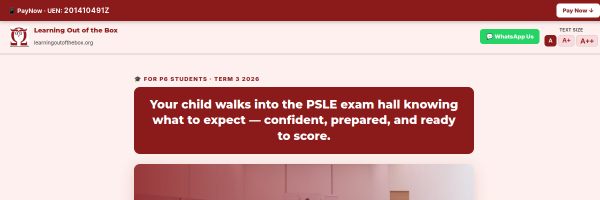
Build your programme sales page

Hero · Problem · What's included · Testimonials · Pricing · FAQ · CTA. One page that answers every question a parent has before they message you.
✦ Claude Prompt
Build a sales page for my [programme name] — a [X-week / X-session] [subject] programme for [target student, e.g. P5–P6 students preparing for PSLE]. Sections to include: 1. Hero: "[Programme Name] — [Outcome promise]" + CTA button → [WhatsApp or registration URL] 2. The problem: what parents and students feel right now (3 pain points) 3. What's included: [list sessions, materials, bonuses] 4. Outcomes: 3 things students will be able to do by the end 5. Testimonials: [I will provide 3 quotes] 6. Price: $[X] — [what it includes] 7. FAQ: [list 4 questions] 8. Final CTA button My brand colours: [HEX1] primary, [HEX2] accent. Font: DM Serif Display (headings), DM Sans (body). Mobile-first. Deploy on Vercel.
6d

Set up payment collection

ThriveCart is recommended for clean checkout pages. To start, PayNow or bank transfer with a simple confirmation message works fine.

ℹ️PAC members get access to a ThriveCart setup guide under Resources → Product Creation.
6e

Build a simple onboarding page

What happens after they pay. First steps, what to prepare, schedule, and how to contact you. Removes anxiety. Builds confidence.

✦ Claude Prompt
Build a simple onboarding page for new students of my [programme name]. Sections: 1. Welcome message (warm, personal, reassuring) 2. What to prepare before the first session 3. Schedule: [session days/times] 4. What to expect in the first 2 weeks 5. How to contact me: [WhatsApp / email] Design: Clean, warm, friendly — use colours [HEX1] and [HEX2]. Mobile-friendly. Deploy on Vercel.
7
Phase 7

Social Proof & Growth

Make your results visible. Let your students' wins do the selling. This phase turns happy parents into your most powerful marketing channel.

7a

Build a testimonials / results page

Screenshots, quotes, before-and-after scores. One page that consolidates all your social proof. Link to it from your programme page and IG bio.

✦ Claude Prompt
Build a testimonials page for a [subject] tutor. Include: 1. A hero section: "Real Students. Real Results." with a subline about your niche 2. A 2-column grid of quote cards (I'll provide the testimonials) 3. A "Featured Result" section highlighting one standout student story 4. A CTA at the bottom: "Ready to see results like these? [WhatsApp / register link]" Design: trustworthy, clean — colours [HEX1] and [HEX2]. Mobile-friendly. Deploy on Vercel.
7b

Create a content calendar

3 posts/week: 1 carousel (pain point) + 1 short tip reel + 1 personal/story post. Consistency compounds — each post seeds the next lead magnet request.

🎬 For reels, use CapCut or the built-in Edit app inside Instagram — both are free and beginner-friendly.

✦ Claude Prompt
Create a 4-week Instagram content calendar for a [subject] tutor targeting [audience — e.g. parents of P5–P6 students in Singapore]. Posting rhythm: 3 posts/week - Monday: Carousel (pain point + lead magnet CTA) - Wednesday: Short tip (reel or single image) - Friday: Personal or story post (build connection) For each post, give me: - Hook idea (first line) - Content angle - CTA suggestion Focus topics: [list 3–4 recurring themes relevant to your subject]
7c

Build a referral system

Your happiest parents are your best marketers. Make it easy and natural for them to refer a friend. One WhatsApp message is all it takes to start.

✦ Claude Prompt
Write a referral WhatsApp message I can send to current parents asking them to recommend my [subject] class to one friend whose child is struggling. Include: - A genuine reason to reach out (not transactional) - A simple ask: "If you know anyone who could benefit…" - Optional: a thank-you offer (e.g. one free session, discount on next month) Keep it real, under 80 words, not like a marketing email.
7d

Create a case study page

One student story. Before → struggle → what you did together → transformation. The most powerful sales page you'll ever have — because it's true.

✦ Claude Prompt
Build a case study page for my [subject] tutoring. Student: [first name only, or "a student" for privacy]. Sections: 1. Hero: "[Student Name]'s Story" — one-line outcome 2. The Challenge: what they were struggling with before 3. What We Did Together: your approach (3–4 sentences) 4. The Result: specific improvement (score, confidence, mindset) 5. In Their Words: one parent quote 6. CTA: "Is this your child's story too? [WhatsApp link]" Design: emotional, clean — colours [HEX1] and [HEX2]. Deploy on Vercel.